
Why Progressive Web Apps Might Be Replacing Traditional Mobile Apps
Why Progressive Web Apps Might Be Replacing Traditional Mobile Apps
For years, the default answer to “we need a mobile presence” was simple: build an app. Companies hired iOS and Android teams, submitted to app stores, and hoped users would download, keep, and open their product. That model worked when app stores were less crowded and user attention was easier to capture.
That era is fading. Users now download fewer apps than ever, delete them quickly, and increasingly expect instant access without installation. Meanwhile, the web has caught up in ways that were not possible a decade ago. Service workers, web app manifests, and modern browser APIs have closed much of the gap between websites and native apps.
The result is not a dramatic overnight switch. It is a quiet migration. Businesses are quietly choosing Progressive Web Apps for use cases that once demanded native development, and the reasons are practical rather than ideological. Understanding this shift requires looking beyond hype and examining what actually changed in user behavior, technology, and business economics.
What a Progressive Web App Actually Is
A Progressive Web App is not simply a responsive website. It is a web application that meets specific technical and experiential criteria.
Those criteria include:
- Reliable loading even on unstable networks
- Installability on the home screen without an app store
- Offline or low-connectivity functionality
- Secure delivery over HTTPS
- App-like navigation and interaction patterns
- Automatic updates without user action
PWA is not a universal replacement for every native app. It is a different tool with different trade-offs. Understanding those trade-offs is more useful than treating PWAs as a silver bullet. A PWA cannot access every hardware feature, cannot guarantee identical behavior across all browsers, and cannot replicate the deep system integration that native apps enjoy. Pretending otherwise leads to poor decisions.
The more accurate framing is that PWAs are an alternative delivery model for mobile experiences, not a superior technology across the board. They win in some contexts and lose in others, and the businesses that succeed are the ones that recognize the difference early.
The Real Reason Businesses Are Switching
The shift toward PWAs is rarely driven by technology enthusiasm. It is driven by three uncomfortable realities that native apps force businesses to confront.
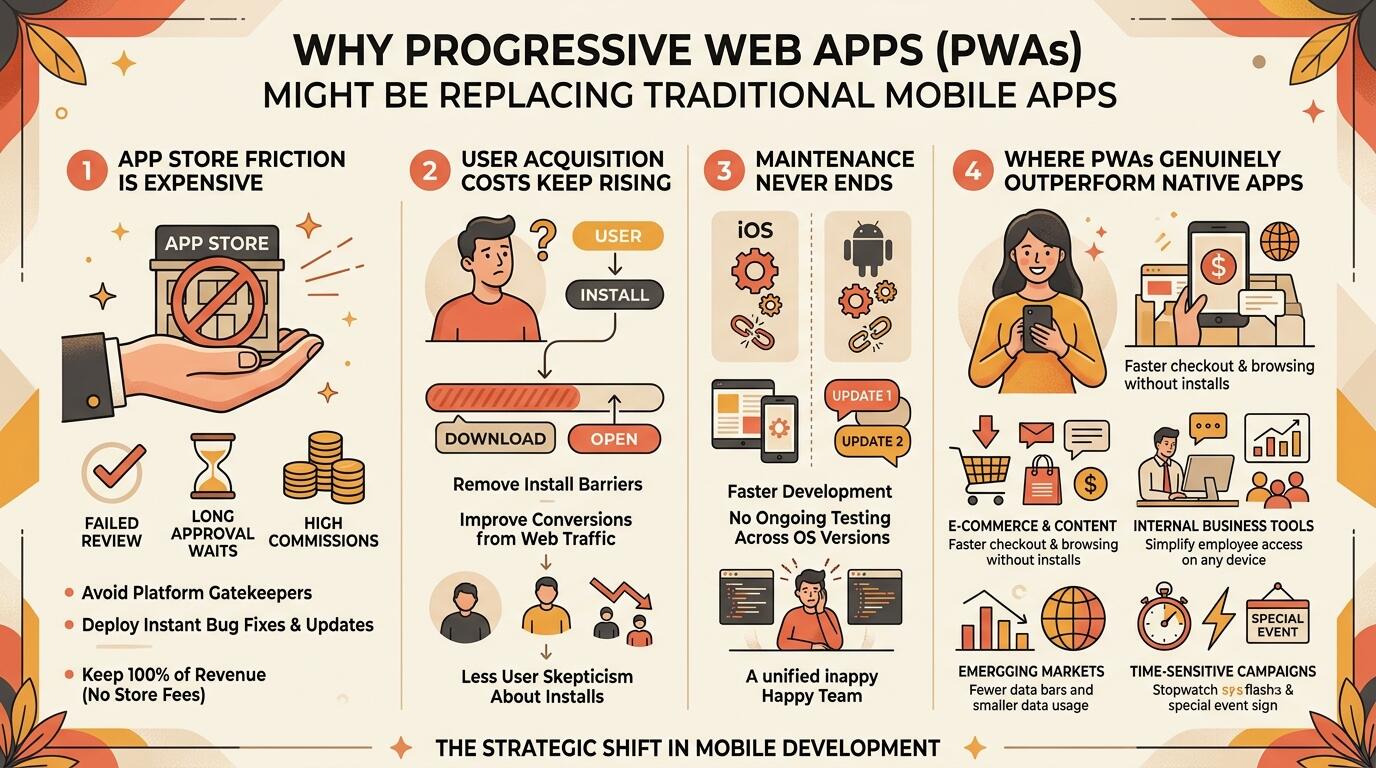
1. App Store Friction Is Expensive
Every native app must pass review, comply with platform policies, and wait for approval before reaching users. A bug fix that should take hours can take days. A feature that violates a store guideline can be blocked entirely. For businesses that need speed, this friction is a competitive disadvantage.
App store commissions also cut into revenue, particularly for subscription and digital goods businesses. While some platforms have reduced these fees for smaller developers, the underlying structure still means that a portion of every transaction goes to the store rather than the business.
2. User Acquisition Costs Keep Rising
Getting a user to download an app is harder than getting them to visit a website. Install prompts are ignored, storage space is limited, and users are skeptical of unfamiliar apps. Many businesses spend heavily on install campaigns only to see most users abandon the app within days.
This pattern is well documented. Retention rates for newly installed apps are notoriously low, and the cost of acquiring a single loyal user continues to climb. For many businesses, the math simply does not work.
3. Maintenance Never Ends
Native apps require ongoing updates for new OS versions, new device sizes, and new security requirements. Two platforms mean two codebases, two release cycles, and two sets of bugs. For many businesses, this is unsustainable.
Every major iOS or Android release brings a new round of testing, compatibility fixes, and potential breakage. Smaller teams often cannot keep up, leading to neglected apps that slowly rot in the store.
PWAs address all three by removing the store from the equation, reducing acquisition friction, and consolidating development into a single codebase.
Where PWAs Genuinely Outperform Native Apps
It is easy to overstate PWA benefits. Here is where they genuinely win.
E-commerce and content platforms
Users can browse, search, and purchase without installing anything. Offline caching keeps previously viewed content accessible. For businesses that rely on casual or first-time visitors, removing the install barrier directly improves conversion.
Internal business tools
Employees can access dashboards, forms, and workflows through a browser without IT managing app distribution. This is especially valuable for companies with a mix of company-issued and personal devices.
Emerging markets
Where device storage is limited and data is expensive, PWAs offer a lighter alternative to large native downloads. Users can access the same functionality without sacrificing space or bandwidth.
Time-sensitive campaigns
A PWA can be deployed and updated instantly, making it ideal for short-term promotions or event-based experiences. There is no waiting for review, no version fragmentation, and no user action required to receive updates.
In these scenarios, the PWA model is not a compromise. It is the better fit.
Where Native Apps Still Win
A balanced view matters. Native apps retain clear advantages in specific areas.
Heavy hardware access
Advanced camera features, Bluetooth peripherals, AR, and complex sensors are still better supported natively. If your product depends on precise hardware control, native development remains necessary.
Performance-critical applications
High-frame-rate gaming, video editing, and real-time processing benefit from native performance. The browser adds a layer of abstraction that can introduce latency.
Deep OS integration
Widgets, background processing, and system-level features are more reliable in native apps. Notifications, in particular, have historically been more consistent on native platforms.
Established user bases
If users already have and love your app, there may be little reason to replace it. Migration carries risk, and sometimes the best decision is to maintain what already works.
The honest conclusion is that PWAs are replacing native apps in some categories, not all of them.
The Hidden Costs Nobody Talks About
PWAs are often described as cheaper, but that framing hides important details.
- Offline functionality requires careful architecture and testing
- Push notifications on iOS have historically been more limited
- Browser inconsistencies still require workarounds
- Discoverability in app stores is lost entirely
- Some users still expect a native app and distrust web alternatives
These are not dealbreakers, but they are real. Businesses that ignore them often end up disappointed. A PWA that fails to work offline, or that cannot send reliable notifications, can be worse than no app at all because it damages user trust.
What Happens After the Switch
Moving from native to PWA is not a one-time decision. It changes how a business operates.
Teams must rethink:
- How users are onboarded without an install step
- How updates are communicated without app store release notes
- How performance is monitored across browsers
- How support handles issues that were previously device-specific
This operational shift is often underestimated and is the main reason some PWA migrations fail. The technology is only half the challenge. The other half is adjusting internal processes, expectations, and support workflows to match a model that behaves differently from native development.
When a Business Should Consider a PWA
A PWA is worth serious consideration when:
- Users are unlikely to install an app
- Development resources are limited
- Cross-platform reach is essential
- Store fees or policies are a constraint
- Offline access would add real value
- Speed to market matters more than deep OS integration
It is less suitable when the product depends on advanced device capabilities or when an existing native app already has strong engagement.
How to Choose the Right Approach
The decision should not be framed as PWA versus native. It should be framed as which approach fits the product, the audience, and the business model.
Useful questions include:
- Do users need this daily or occasionally?
- Does the product rely on hardware features?
- Is discoverability through app stores important?
- Can the team maintain two native codebases?
- What does the competition use, and why?
Answering these honestly usually makes the decision obvious. In many cases, the answer is not one or the other but a combination: a PWA for broad reach and a native app for power users.
Conclusion
Progressive Web Apps are not replacing every native app. They are replacing the native apps that never needed to be native in the first place. For businesses that value reach, speed, and lower maintenance overhead, PWAs offer a compelling alternative. For products that depend on deep hardware integration or peak performance, native development remains the right choice.
The real shift is not technological. It is strategic. Businesses are becoming more deliberate about when an app is truly necessary, and that clarity is what is quietly reshaping mobile development.
FAQs
1. Are Progressive Web Apps really replacing native apps?
In some categories, yes. E-commerce, content, and internal tools are increasingly delivered as PWAs. In others, such as gaming and hardware-intensive apps, native development remains dominant.
2. What is the biggest disadvantage of a PWA?
The biggest limitation is reduced access to advanced device features and inconsistent behavior across browsers. Push notifications and background processing have also historically been more restricted on iOS.
3. Do PWAs work offline?
Yes, if built correctly. Service workers allow a PWA to cache assets and data so users can continue using parts of the app without a connection.
4. Can a PWA appear in app stores?
Not in the traditional sense. PWAs are installed through the browser. Some platforms allow listing PWAs in stores, but this is not the same as a native app listing.
5. How do I decide between a PWA and a native app?
Start with user behavior and product requirements. If users need occasional access, fast loading, and broad reach, a PWA is often better. If the product depends on deep hardware access or peak performance, native is usually the right choice.