
PHP Security Vulnerabilities in 2026: What Website Owners Need to Know
PHP Security Vulnerabilities in 2026: What Website Owners Need to Know
Websites play an essential role in modern business, from generating leads and processing enquiries to supporting online sales and customer communication. However, behind every website is a technical infrastructure that must be maintained to keep it secure.
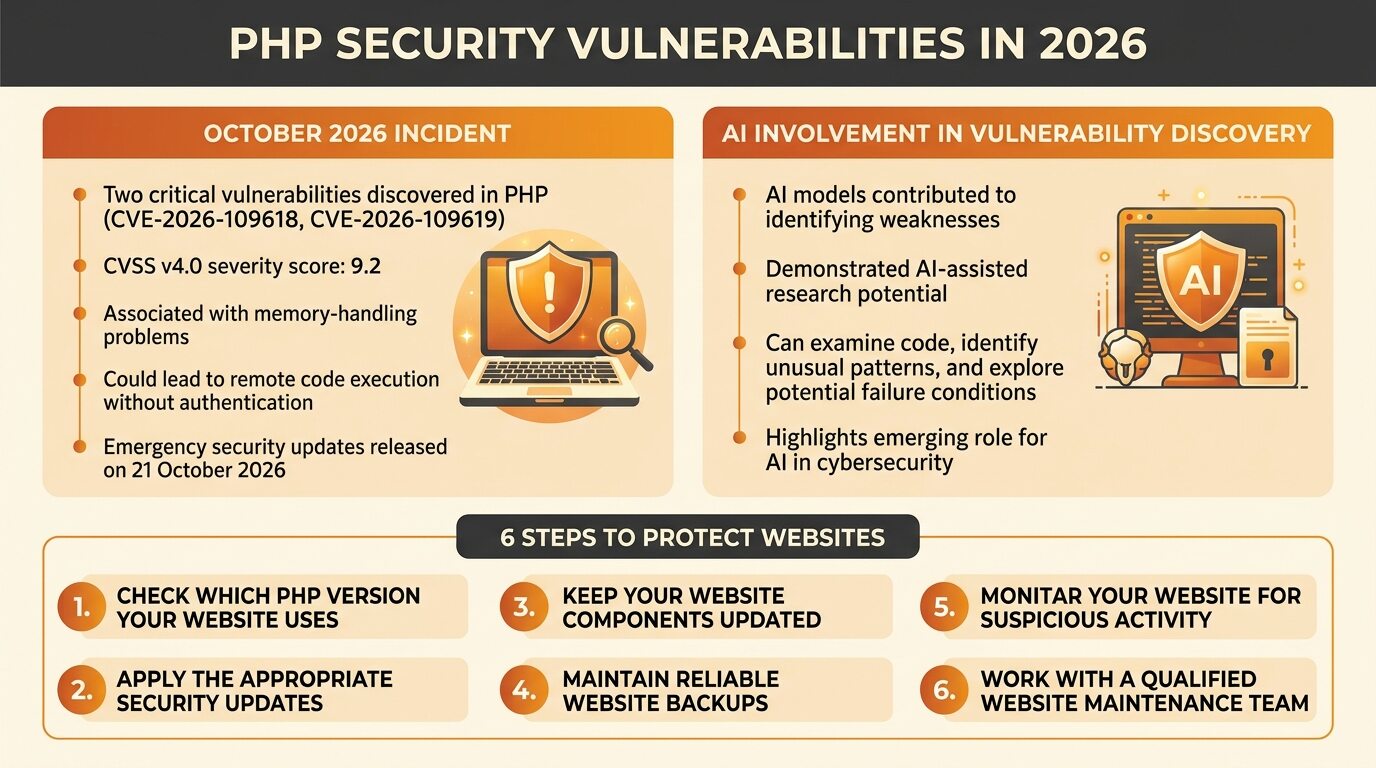
In October 2026, two critical security vulnerabilities discovered in PHP triggered an international cybersecurity response. The flaws raised concerns because PHP is widely used to power websites and web applications, including many content management systems.
According to the PHP project’s official security advisory, the vulnerabilities could allow attackers to execute malicious code on affected servers without authentication. Emergency security updates were released on 21 October 2026.
The discovery also highlighted an emerging role for artificial intelligence (AI) in cybersecurity, demonstrating how AI-assisted research can help identify weaknesses in software that has been used for years.
For business owners, the incident is a reminder that website security requires more than a strong password or a well-designed homepage. Keeping the underlying software updated is equally important.
What Is PHP and Why Is It Important for Websites?
PHP, short for PHP: Hypertext Preprocessor, is a server-side programming language commonly used to develop websites and web applications.
Unlike HTML, which structures content displayed in a browser, PHP can process requests, communicate with databases and generate dynamic content on a web server.
PHP supports a wide range of online platforms, including WordPress websites, e-commerce stores and custom web applications.
For example, when a visitor submits a contact form, logs into an account or interacts with certain website features, PHP may process the request behind the scenes.
Because PHP operates on the server, vulnerabilities within the language itself can have consequences beyond a single webpage.
If attackers successfully exploit a serious PHP vulnerability, they may be able to compromise the server environment, potentially exposing sensitive information or disrupting website operations.
This is why maintaining a secure PHP environment is an important part of website management.
What Happened in the 2026 PHP Security Incident?
In October 2026, the PHP development team announced two critical vulnerabilities, identified as CVE-2026-109618 and CVE-2026-109619. Both received a CVSS v4.0 severity score of 9.2.
The vulnerabilities were associated with memory-handling problems that could potentially lead to remote code execution.
In simple terms, remote code execution means an attacker may be able to run commands or code on a vulnerable computer system from another location. In this case, the risk involved web servers running affected PHP installations.
The incident prompted cybersecurity agencies to advise organisations to identify their PHP-based systems and apply the available security updates as soon as possible.
Some organisations also considered temporarily taking affected systems offline when they could not mitigate the risks quickly enough.
The PHP project subsequently released patched versions for several supported branches:
PHP 8.5.12
PHP 8.4.27
PHP 8.3.36
PHP 8.2.35
These versions address the two critical vulnerabilities. Website owners should consult the official PHP security advisory and their hosting provider to determine the appropriate update for their environment.
The incident demonstrates how a weakness in widely used software can become a concern for organisations across different industries.
How Did AI Help Discover the PHP Vulnerabilities?
One of the most notable aspects of the incident was the role of artificial intelligence in vulnerability research.
According to Google Cloud’s security report, AI models contributed to the research process that identified the PHP vulnerabilities, alongside security researchers and other technical methods.
AI can assist cybersecurity professionals by examining code, identifying unusual patterns, exploring potential failure conditions and helping researchers investigate weaknesses that might otherwise require extensive manual analysis.
However, AI should not be viewed as a replacement for experienced security researchers. Identifying a possible weakness is only one stage of the process. Researchers must still validate the finding, assess its severity, develop an appropriate fix and verify that the fix works.
The same technology can also create challenges when malicious actors use AI to support their own activities.
For businesses, the lesson is not that AI automatically makes websites unsafe. Instead, AI is changing how quickly vulnerabilities may be discovered, investigated and potentially exploited.
Organisations should therefore treat cybersecurity as an ongoing responsibility rather than a one-time technical task.
Why PHP Security Vulnerabilities Matter to Business Websites
A website may appear to function normally while still running vulnerable software in the background. This makes security maintenance particularly important for businesses that depend on their websites to attract and serve customers.
Several potential risks deserve attention.
1. Unauthorised Access to Website Systems
Remote code execution vulnerabilities may allow attackers to run code on an affected server without first authenticating themselves.
Depending on the server’s permissions and configuration, this could enable further malicious activity, including attempts to access website files or connected systems.
2. Exposure of Sensitive Information
A compromised website environment may put information such as customer records, login credentials, API keys or other sensitive data at risk.
The actual impact depends on the attack, the information available to the server process and the site’s security controls.
3. Website Downtime and Business Disruption
A security incident may require a website to be isolated, investigated or restored.
For businesses that rely on online enquiries, booking systems or e-commerce transactions, downtime can interrupt customer journeys and reduce opportunities to generate revenue.
4. Loss of Customer Confidence
Customers expect businesses to handle their information responsibly.
A website compromise can damage trust, particularly when the incident affects customer data or prevents people from accessing important services.
5. Additional Recovery Costs
Recovering from a website security incident may involve technical investigation, malware removal, restoration from backups and additional security work.
Regular maintenance and timely updates can help reduce the likelihood of avoidable problems, although no single measure can eliminate every cybersecurity risk.
Is Your WordPress Website at Risk?
WordPress is built using PHP, so the security of its underlying PHP environment matters to website owners.
However, it is important to understand that the October 2026 vulnerabilities affect PHP itself, rather than being vulnerabilities exclusive to WordPress.
According to the official WordPress security announcement, no separate WordPress update is required to fix these specific PHP vulnerabilities. The PHP runtime needs to be updated through the appropriate server or hosting environment.
If you manage a WordPress website, you can check its PHP version by navigating to:
WordPress Dashboard → Tools → Site Health → Info → Server
You can also find PHP information through your hosting control panel, depending on your provider.
If your website uses a vulnerable version, contact your hosting provider or website administrator to confirm that the relevant security update has been applied.
Updating WordPress themes and plugins remains important for overall website security, but those updates should not be confused with patching the PHP runtime itself.
Website owners should also remember that custom PHP applications and other PHP-based platforms may require the same attention.
6 Steps to Protect Your Website from PHP Security Risks
Although website security can involve complex technical work, business owners can take several practical steps to improve their protection.
1. Check Which PHP Version Your Website Uses
Start by identifying the PHP version running on your website.
If you use a hosting provider, ask its support team whether your environment is affected by the October 2026 vulnerabilities and whether the relevant security patch has been applied.
Do not assume that a website is safe simply because it loads normally.
2. Apply the Appropriate Security Updates
Updating vulnerable software is one of the most important ways to address known security weaknesses.
Work with your hosting provider or technical team to install the appropriate patched PHP version. Confirm compatibility with your website, themes, plugins and custom applications before making changes.
Where possible, test updates in a staging environment and maintain a recovery plan.
3. Keep Your Website Components Updated
PHP is only one part of a website’s technical environment.
WordPress core software, themes, plugins, extensions and other server components may have their own security updates.
Maintain an inventory of these components and remove software that is no longer needed. Outdated or unsupported components can introduce additional risks.
4. Maintain Reliable Website Backups
Regular backups can help restore a website following accidental changes, technical failures or certain security incidents.
A suitable backup strategy should include website files and databases, with copies stored securely and separately from the production environment where possible.
Most importantly, test the restoration process. A backup is only useful if it can be recovered successfully.
5. Monitor Your Website for Suspicious Activity
Security monitoring can help identify unusual activity that may require further investigation.
Depending on your website and hosting environment, useful measures may include reviewing server logs, monitoring unexpected file changes, checking for unfamiliar administrator accounts and investigating unusual traffic patterns.
If you suspect a compromise, avoid assuming that installing a patch alone resolves the entire incident. An already compromised server may require a separate investigation and remediation process.
6. Work with a Qualified Website Maintenance Team
Not every business has the technical expertise or access required to manage server-level security.
A qualified website maintenance team can help coordinate with hosting providers, review website components, plan updates and check that the website continues to function correctly after maintenance.
For business owners, this approach helps ensure that security tasks are not overlooked while attention is focused on daily operations.
Website Security Is an Ongoing Responsibility
The PHP security incident illustrates an important point: even widely used and established technologies can contain vulnerabilities that remain undiscovered for years.
Keeping a website secure requires continuous attention to software updates, backups, access controls and monitoring. It also requires a clear process for responding when new vulnerabilities are announced.
AI is likely to play an increasingly important role in discovering software weaknesses. While this can help defenders identify problems, it also reinforces the need for businesses to respond quickly when credible security advisories are published.
Rather than waiting for visible signs of trouble, website owners should establish a regular maintenance routine and know who is responsible for keeping their websites and hosting environments up to date.
A website is not simply an online marketing asset. It is also a technical system that needs proper care to remain reliable, secure and accessible.
Conclusion
The 2026 PHP security vulnerabilities serve as a reminder that website security cannot be ignored, even when a website appears to be operating normally.
The vulnerabilities could allow unauthenticated attackers to execute code on affected servers, prompting security agencies to call for immediate updates. The incident also demonstrated how AI-assisted research is changing the cybersecurity landscape.
For business owners, the most practical response is to check the PHP environment, confirm that the appropriate security updates have been applied, maintain reliable backups and keep other website components updated.
Taking these steps can reduce exposure to known vulnerabilities and support a more resilient online presence.
FAQs
1. What are PHP security vulnerabilities?
PHP security vulnerabilities are weaknesses in the PHP programming language or its implementation that could be exploited to affect the security of a website or server. Depending on the vulnerability, attackers may be able to access sensitive information, disrupt services or execute unauthorised code.
2. What are the PHP vulnerabilities discovered in October 2026?
The two critical vulnerabilities are CVE-2026-109618 and CVE-2026-109619. They involve memory-handling issues that could lead to remote code execution on affected PHP installations. PHP released security fixes on 21 October 2026.
3. Does the PHP security issue affect WordPress websites?
WordPress uses PHP, so WordPress websites running affected PHP installations may be at risk. The vulnerabilities are in PHP itself rather than WordPress specifically. Website owners should confirm their PHP version and coordinate the necessary updates with their hosting provider.
4. How do I check my website’s PHP version?
For WordPress, open the dashboard and navigate to Tools, then Site Health, then Info, and finally Server. Your hosting control panel may also display the PHP version. If you cannot access these settings, ask your hosting provider or website administrator.
5. What should I do if my website uses a vulnerable PHP version?
Contact your hosting provider or technical administrator promptly to confirm the affected version and apply the appropriate security update. If immediate remediation is not possible, follow official security guidance regarding temporary mitigation or isolation of the affected system.