
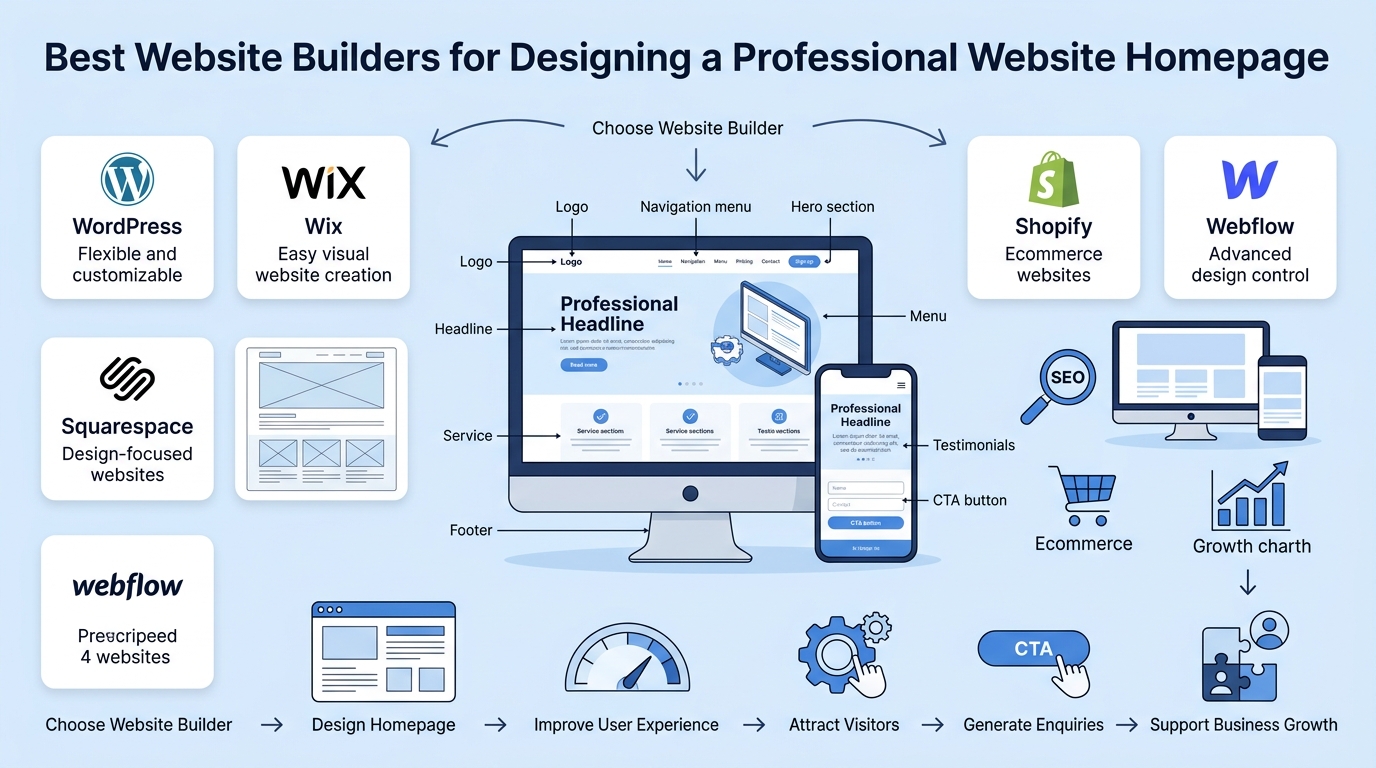
What Are the Best Website Builders for Designing a Professional Website Homepage
What Are the Best Website Builders for Designing a Professional Website Homepage
A professional website homepage is often the first place customers interact with a business online. It should quickly communicate what the business offers, build trust, and guide visitors toward useful actions such as requesting a quotation, booking a service, making a purchase, or contacting the company.
Choosing the right website builder can make this process easier. Different website builders provide different levels of design flexibility, content management, SEO tools, mobile responsiveness, ecommerce features, and customization.
The best website builder is therefore not necessarily the platform with the most features. It is the platform that provides the right tools for creating a homepage that matches the business, serves its customers, and supports long-term growth.
Why Your Website Homepage Matters
The homepage is usually one of the most important pages on a business website.
Visitors should be able to understand the business within a few seconds of arriving on the page.
A strong homepage can help businesses:
• Introduce their brand
• Explain their main services
• Build customer trust
• Highlight important information
• Generate enquiries
• Direct visitors to other pages
• Encourage customers to take action
A well-designed homepage creates a clear starting point for the rest of the customer journey.
What Should a Professional Website Homepage Include?
Before choosing a website builder, businesses should understand what they need to create.
A professional homepage may include:
• Business logo and branding
• Clear headline
• Short introduction
• Service information
• Strong call-to-action buttons
• Customer testimonials
• Images or videos
• Contact information
• Navigation menu
• Social media links
• Contact or enquiry forms
The website builder should make it easy to organize these elements into a clear and attractive layout.
How to Choose the Right Website Builder
There are many website builders available, and each platform is designed for different types of users and websites.
Some platforms focus on simple website creation, while others provide greater customization or specialized ecommerce functionality.
When comparing website builders, businesses should consider:
• Ease of use
• Design flexibility
• Mobile responsiveness
• SEO features
• Website performance
• Security
• Ecommerce functionality
• Integrations
• Content management
• Scalability
Understanding these factors can help businesses avoid choosing a platform based only on price or attractive templates.
WordPress for Flexible Website Design
WordPress is one of the most flexible options for businesses that want greater control over their website.
The platform provides themes, blocks, plugins, and customization options that allow businesses to create different types of websites. WordPress also allows additional functionality to be added through its extensive plugin ecosystem.
WordPress can be suitable for businesses that want:
• Flexible website design
• Custom functionality
• Blogging capabilities
• SEO tools
• Ecommerce integration
• Third-party integrations
• Long-term website expansion
For businesses planning to grow their website over time, this flexibility can be particularly useful.
Wix for Easy Website Creation
Wix is designed to make website creation accessible without requiring advanced coding knowledge.
Its visual editing tools and templates can help businesses create professional pages while managing content through a relatively straightforward interface. Wix also provides tools for SEO, analytics, ecommerce, bookings, and marketing.
Wix may be suitable for:
• Small businesses
• Service businesses
• Freelancers
• Portfolio websites
• Simple ecommerce websites
• Businesses that want to launch quickly
For businesses that prioritize ease of use, a visual website builder can reduce the technical barrier involved in creating a website.
Squarespace for Design-Focused Websites
Squarespace is known for its design-focused approach and professionally styled templates.
It can be useful for businesses that want their homepage to place a strong emphasis on visual presentation and branding.
A design-focused platform can be particularly useful for:
• Creative businesses
• Photography websites
• Personal brands
• Professional portfolios
• Service businesses
• Lifestyle brands
A visually polished homepage can help businesses create a stronger first impression when design plays an important role in their brand identity.
Shopify for Ecommerce Websites
Businesses that primarily sell products online may require more than a standard business homepage.
Shopify is designed around ecommerce and provides tools for product management, online selling, checkout, payments, shipping, analytics, and additional integrations.
Shopify can be suitable for:
• Online stores
• Retail businesses
• Product-based brands
• Subscription businesses
• Growing ecommerce companies
For ecommerce businesses, the homepage needs to connect naturally with product categories, featured products, promotions, and purchasing processes.
Webflow for Greater Design Control
Webflow provides a visual website development environment with greater control over layouts and styling.
This can make it attractive for designers and businesses that want more control over how their website looks and behaves.
Webflow may be suitable for:
• Professional designers
• Creative agencies
• Marketing websites
• Custom business websites
• Design-focused brands
Businesses with more advanced design requirements may benefit from a platform that provides greater control over page layouts and visual elements.
Compare Website Builders Based on Your Needs
There is no single website builder that is perfect for every business.
Different platforms are commonly positioned for different use cases. Current 2026 comparisons continue to highlight differences between platforms based on ease of use, design control, ecommerce, customization, and business requirements.
A simple comparison can help:
| Website Builder | Suitable For | Main Strength |
|---|---|---|
| WordPress | Flexible business websites | Customization |
| Wix | Small businesses and beginners | Ease of use |
| Squarespace | Design-focused websites | Visual presentation |
| Shopify | Ecommerce businesses | Online selling |
| Webflow | Designers and custom websites | Design control |
The right option depends on what the business wants its website to achieve.
Consider Mobile Responsiveness
A professional homepage should work properly across different devices.
Customers may visit a website using:
• Smartphones
• Tablets
• Laptops
• Desktop computers
A responsive website builder allows the homepage layout to adapt to different screen sizes.
Important mobile considerations include:
• Readable text
• Easy navigation
• Properly sized images
• Clear buttons
• Simple forms
• Fast loading
A homepage that looks good on desktop but is difficult to use on mobile can create a poor customer experience.
Look for SEO Features
A website builder should also support basic SEO requirements.
Important features may include:
• Custom page titles
• Meta descriptions
• Search-friendly URLs
• Heading structures
• Image optimization
• Mobile responsiveness
• Internal linking
• Website performance
SEO-friendly website features provide a stronger foundation for businesses that want their homepage and other pages to appear in search results.
Consider Website Speed
Visual design should not come at the expense of performance.
Large images, unnecessary animations, excessive scripts, and poorly optimized elements can make a homepage slower.
When selecting a website builder, businesses should consider whether the platform supports:
• Image optimization
• Responsive images
• Caching
• Performance optimization
• Efficient page loading
A faster homepage can create a smoother experience for visitors and make it easier for customers to explore the website.
Check Customization Options
A professional website should reflect the business rather than look exactly like thousands of other websites.
Customization options may include:
• Brand colours
• Fonts
• Page layouts
• Buttons
• Images
• Navigation
• Sections
• Animations
• Custom code
The amount of customization required depends on the business.
Some companies may prefer a simple template-based website, while others may need a highly customized design.
Look for Useful Business Integrations
Modern business websites often need to connect with other tools.
Depending on the business, useful integrations may include:
• Google Maps
• Email marketing
• CRM systems
• Analytics
• Social media
• Appointment booking
• Payment gateways
• Ecommerce systems
Choosing a website builder that supports the required integrations can make it easier to manage customer interactions and business processes.
Think About Website Security
Website security should also be part of the decision-making process.
Businesses may collect customer information through forms, bookings, subscriptions, or online purchases.
Important security considerations include:
• SSL protection
• Secure login systems
• Regular updates
• Website backups
• Secure payment systems
• Security monitoring
A secure website helps protect business information and gives customers greater confidence when interacting with the company.
Consider Future Website Growth
A website may begin with only a homepage and a few service pages.
As the business grows, it may need:
• Additional service pages
• Blog articles
• Landing pages
• Online booking
• Ecommerce functionality
• Customer accounts
• New integrations
• Marketing tools
The website builder should be able to support these changes without making the website unnecessarily difficult to manage.
Choosing a scalable platform can reduce the need for a complete website rebuild later.
Don’t Choose a Website Builder Based Only on Price
Price is an important consideration, but it should not be the only deciding factor.
A cheaper platform may have limitations that affect future website development.
Businesses should consider the overall cost of:
• Website plans
• Domain registration
• Hosting
• Premium templates
• Plugins
• Extensions
• Ecommerce features
• Maintenance
• Professional development
Comparing the total cost can provide a better understanding of the long-term value of each platform.
Focus on the Customer Experience
The website builder is only a tool.
The final goal is to create a website that customers can understand and use easily.
A professional homepage should answer important questions such as:
• What does this business do?
• Who does it help?
• What services does it offer?
• Why should customers trust it?
• How can customers contact the business?
• What should visitors do next?
A website builder should make it easier to create this experience rather than distract from it.
Common Website Builder Mistakes to Avoid
Businesses should avoid:
❌ Choosing a platform only because it has attractive templates
❌ Ignoring mobile responsiveness
❌ Selecting a platform without checking SEO features
❌ Choosing a builder that cannot support future growth
❌ Adding too many unnecessary design elements
❌ Ignoring website speed
❌ Forgetting security requirements
❌ Focusing on design while ignoring user experience
The best website builder should support both the visual and functional requirements of the website.
Which Website Builder Is Best for Your Business?
The best website builder depends on the type of website you need.
WordPress can be a strong choice when flexibility and customization are priorities. Wix can be useful for businesses looking for an easier visual website-building experience. Squarespace can suit design-focused websites, while Shopify is particularly relevant for ecommerce. Webflow can be useful when greater design control is required.
Instead of asking which platform is universally the best, businesses should ask which platform is best suited to their goals, customers, budget, and future plans.
Why the Right Website Builder Matters
Choosing the right website builder can make a significant difference to how a homepage is created and managed.
The right platform can help businesses:
✔ Create a professional online presence
✔ Improve website usability
✔ Support mobile users
✔ Manage content more easily
✔ Improve SEO foundations
✔ Integrate useful business tools
✔ Support future website growth
A strong website starts with the right foundation.
Conclusion
Choosing the best website builder for a professional website homepage depends on the specific needs of the business.
WordPress, Wix, Squarespace, Shopify, and Webflow each provide different advantages, making them suitable for different types of websites and users.
Before choosing a platform, businesses should consider design flexibility, mobile responsiveness, SEO features, website performance, security, integrations, ease of management, and future scalability.
A professional homepage should do more than look attractive. It should communicate the business clearly, provide a smooth customer experience, and guide visitors toward meaningful actions.
By choosing the right website builder and focusing on the needs of their customers, businesses can create a homepage that supports their online presence and long-term growth.
Contact Us
Looking for a professional website homepage that represents your business effectively?
IO Web Studio provides professional website design, website development, SEO, website optimization, and conversion-focused solutions to help businesses create websites that attract visitors and generate enquiries.
Contact us today to discuss your website requirements and build a professional online presence for your business.
FAQs
1. What is the best website builder for a professional homepage?
The best website builder depends on the business’s goals and requirements. WordPress is known for flexibility and customization, Wix focuses on ease of use, Squarespace is design-focused, Shopify is designed primarily for ecommerce, and Webflow provides greater visual design control.
2. Is WordPress good for designing a professional website homepage?
Yes. WordPress provides flexible design tools, themes, blocks, and plugins that allow businesses to create and expand different types of websites. It can be particularly useful when customization and long-term flexibility are important.
3. Which website builder is easiest for beginners?
Website builders such as Wix are designed to simplify the website creation process through visual editing tools and templates. This can make them suitable for beginners and small businesses that want to create a website without extensive coding knowledge.
4. Which website builder is best for an online store?
Shopify is specifically designed around ecommerce and provides tools for product management, online selling, checkout, payments, shipping, analytics, and integrations. This makes it a strong option for businesses whose primary goal is selling products online.
5. What should I look for when choosing a website builder?
Consider design flexibility, mobile responsiveness, SEO features, website speed, security, content management, integrations, pricing, ease of maintenance, and future scalability. The right platform should match your business goals rather than simply offering the largest number of features.
6. Can a website builder help improve my homepage design?
Yes. Website builders provide templates, visual editors, layout tools, responsive design features, and other tools that can simplify homepage creation. However, the quality of the final homepage still depends on how the layout, content, navigation, branding, and calls-to-action are planned.